Support & Ticketing Integration
HelpDesk+BotPenguin

BotPenguin Catches Inbound Questions Before They Become HelpDesk Tickets

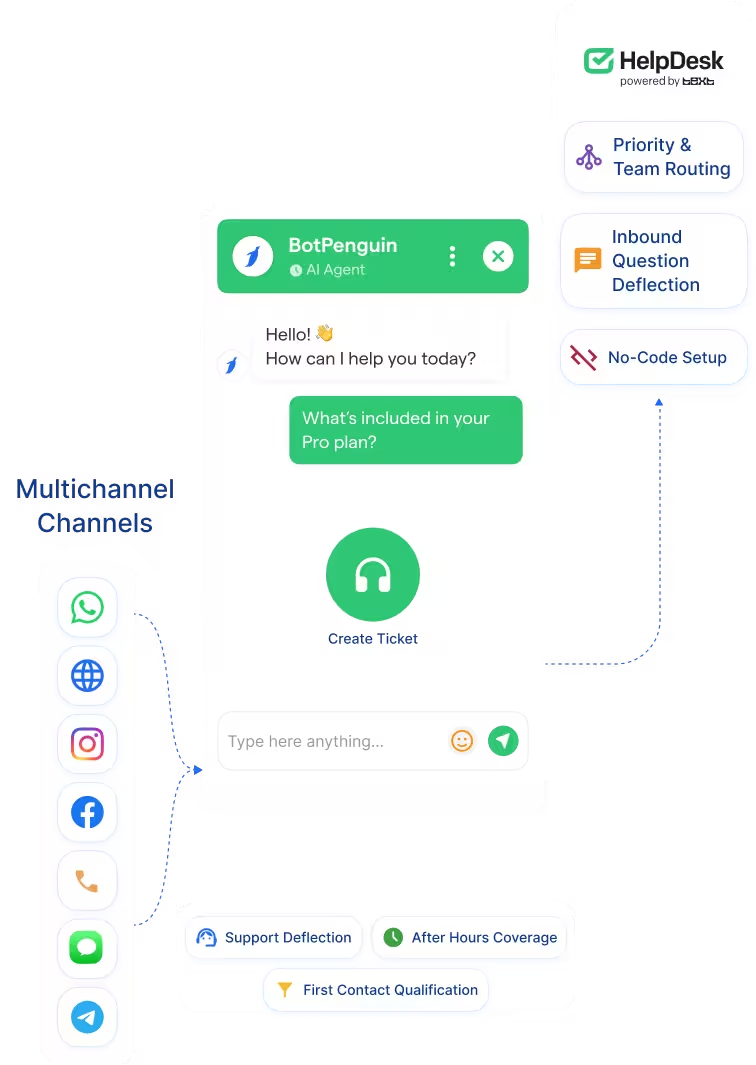
HelpDesk runs your ticketing inbox with precision. But every message that lands there needs an agent to open it, read it, and respond. BotPenguin sits in front of HelpDesk across WhatsApp, your website, and Instagram, resolves what it can automatically, and creates a ticket for everything else with the full conversation already attached.

About This Integration

HelpDesk

Helpdesk & Support

HelpDesk is a ticketing system built for support teams that need to handle volume without losing quality. It centralises customer messages, automates triage, uses AI to summarise tickets and suggest tags, and gives agents the context they need to resolve cases fast. For teams that live inside a support inbox, it is the right tool for the job.

The gap is what comes before the inbox. HelpDesk collects messages once they arrive, but it has no chatbot on WhatsApp, Instagram, or your website to catch them first. Every message that reaches your team, whether it is a billing question someone else already answered or a complex issue that genuinely needs a human, lands as a ticket. Someone has to open it.

BotPenguin changes that. Deploy a no-code AI chatbot on every channel your customers use. Common questions get resolved automatically before a ticket is ever created. Cases that need your team become HelpDesk tickets with the full conversation transcript attached, the right priority set, and the context already captured. Your agents spend time on what only a human can handle. Available on all paid plans. Test it free during your trial.

How BotPenguin Connects to HelpDesk

AI Chatbot to HelpDesk

AI Chatbot to HelpDesk

Your chatbot answers common questions automatically across WhatsApp, your website, and Instagram before they reach your inbox. When a case needs a human, it creates a HelpDesk ticket instantly with the full conversation transcript attached. Your agents pick up with everything they need and nothing to chase.

See AI Chatbots
AI Agent to HelpDesk

AI Agent to HelpDesk

For conversations that need more back and forth, the AI Agent holds a natural multi-step conversation, qualifies the issue, and escalates to HelpDesk as a properly labelled ticket with complete context. No agent needed until the case genuinely requires one.

See AI Agents
Automation to HelpDesk

Automation to HelpDesk

Set rules for which conversations become tickets, which get resolved automatically, and how urgency gets assigned. When the conditions are met, the ticket is created, categorised, and routed in HelpDesk without anyone on your team doing it manually.

See Automations

What BotPenguin Adds to HelpDesk

What HelpDesk is Built For

HelpDesk is built to manage support volume once conversations reach your team. It brings messages together in one inbox, automates triage with AI-powered tag suggestions and language detection, gives agents one-click ticket summaries, and tracks performance across the team. For teams handling hundreds of tickets a month, it keeps everything organised, prioritised, and resolvable without things slipping through.

The Gap

HelpDesk starts working after the message arrives. It cannot reach your customers first, qualify their issue, or resolve it before an agent gets involved. There is no chatbot layer on WhatsApp, Instagram, or your website that intercepts questions early. So every message, regardless of how simple or repetitive, lands as a ticket that needs someone to handle it.

What BotPenguin Adds

BotPenguin is the layer that decides what becomes a ticket and what does not. It sits across every channel your customers use, answers what it can automatically, and sends everything else to HelpDesk as a clean, context-rich ticket. The questions your team used to spend time on get handled before they ever hit the inbox. The ones that genuinely need a human arrive already understood.

80+
Native integrations on BotPenguin
60%
Quicker response time HelpDesk teams see with automations
0
Lines of code needed to connect BotPenguin to HelpDesk
Under 10 min
From signup to your first automated ticket in HelpDesk

Everything the HelpDesk Chatbot Integration Handles for You

Everything the HelpDesk Chatbot Integration Handles for You
  • Automatic Ticket Creation: Every conversation that needs a human becomes a HelpDesk ticket automatically, with the full transcript attached, the right priority set, and the correct team assigned. Your agents never chase context they should already have.
  • Inbound Question Deflection: Common questions get resolved by the chatbot before they reach your inbox. Repetitive, low-complexity issues stop being tickets and start being instant answers on the channel the customer used.
  • Channel-Level Capture: BotPenguin catches customer messages on WhatsApp, Instagram, Facebook, Telegram, and your website before they reach HelpDesk. Each conversation is qualified, routed, or resolved at the source.
  • Pre-Filled Ticket Fields: When a conversation does escalate, the ticket arrives in HelpDesk with name, contact details, issue type, and conversation history already filled in. No manual data entry. No back and forth to clarify what the customer actually wanted.
  • Priority and Team Routing: Based on the chatbot conversation outcome, tickets are automatically categorised and routed to the right team in HelpDesk with the right priority level. No triage needed from your agents.
  • No-Code Setup Connect: HelpDesk to BotPenguin in under ten minutes using your HelpDesk Account ID and Personal Access Token. No developer involvement required.
  • Support Deflection: Handle the questions your team fields most often directly in the chatbot conversation. Password resets, account questions, order status, shipping policies — resolved before a ticket is ever created.
  • After-Hours Coverage: BotPenguin keeps responding when your HelpDesk team is offline. Straightforward questions get resolved instantly. Everything else becomes a prioritised ticket waiting in the inbox when your agents log in.
  • First Contact Qualification: Before a ticket is created, the chatbot collects the customer's name, issue type, account details, and urgency. Agents open a ticket that already tells them everything they need to know.
  • SaaS Technical Support: Qualify incoming technical questions via chatbot. Resolve known issues automatically using documentation. Escalate bug reports and account issues to HelpDesk as labelled, categorised tickets ready for your engineering or support team.
  • eCommerce Issue Handling: Handle returns, order tracking, and product questions automatically across WhatsApp and Instagram. Complex cases become HelpDesk tickets with full order context attached, not raw messages your agent has to decode.
  • WhatsApp: Inbound customer messages qualified and resolved automatically or escalated to HelpDesk as a ticket with the full chat transcript attached. See WhatsApp Chatbots See WhatsApp Chatbots
  • Website Chatbot: Common questions answered instantly from your website. Cases that need an agent create a HelpDesk ticket the moment the conversation ends. See Website Chatbots See Website Chatbots
  • Instagram DMs: Inbound DMs qualified by the bot and escalated to HelpDesk automatically when a human is needed. See Instagram Chatbots See Instagram Chatbots
  • Facebook Messenger: Messenger conversations handled by the chatbot and routed to HelpDesk as tickets with full context when escalation is required. See Facebook Chatbots See Facebook Chatbots
  • Telegram: Telegram bot conversations that need human handling create HelpDesk tickets automatically with the conversation attached. See Telegram Chatbots See Telegram Chatbots
  • SMS: SMS support messages captured, resolved where possible, and escalated to HelpDesk as tickets when a human is required.
  • Microsoft Teams: Internal support requests from Teams routed to HelpDesk automatically without manual intervention. See Teams Chatbot See Teams Chatbot

Live in Under 10 Minutes

No developer needed. Three steps between you and a chatbot creating tickets in HelpDesk automatically.

  1. 1

    Connect Your Accounts

    Step 1
  2. 2

    Build Your Chatbot Flow

    Step 2
  3. 3

    Test and Go Live

    Step 3

What Support Teams Achieve with BotPenguin and HelpDesk

Ticket Volume

50%

reduction in inbound ticket volume after BotPenguin began resolving common questions automatically before they reached the HelpDesk inbox.

Resolution Time

2x

faster average ticket resolution time after BotPenguin pre-qualified and categorized cases before they landed in HelpDesk.

Agent Efficiency

40%

more tickets handled per agent per week after removing repetitive low-complexity questions from the HelpDesk queue.

Connect Your AI Chatbot, WhatsApp Bot and Automation Workflows to 80+ Tools With Zero Switching Costs

Connect BotPenguin's conversational AI to your CRM, payment gateway, calendar and eCommerce platform in minutes. No-code, no disruption. Your existing tech stack stays exactly as it is.

ChatGPT integration logoPabbly integration logoZoho CRM integration logoHubSpot integration logoTeamgate CRM integration logoZendesk integration logoWebHoper integration logoInsightly CRM integration logoNo CRM integration logoZapier integration logo
  • ChatGPT integration logo
  • Pabbly integration logo
  • Zoho CRM integration logo
  • HubSpot integration logo
  • Teamgate CRM integration logo
  • Zendesk integration logo
  • WebHoper integration logo
  • Insightly CRM integration logo
  • No CRM integration logo
  • Zapier integration logo
  • Copper CRM integration logo

Fewer Tickets in Your Inbox. More Context on Every Case That Gets There.

Free to start. No credit card required.

Frequently Asked Questions About the HelpDesk Chatbot Integration