
Conversational Booking Chatbot
Collect the service type, preferred date and time, and client details via WhatsApp or the website chat. Then send booking-ready details to SimplyBook.
See AI Chatbots +
+
Customers want to book on their phone. BotPenguin lets them book through WhatsApp or website chat, then sends the details to SimplyBook.
This SimplyBook chatbot integration connects BotPenguin booking conversations with your SimplyBook scheduling setup. It helps service businesses accept appointment requests through WhatsApp, website chat, Instagram, and more.
SimplyBook helps businesses manage online booking, calendars, reminders, payments, cancellations, and rescheduling. But many clients still start by messaging your business.
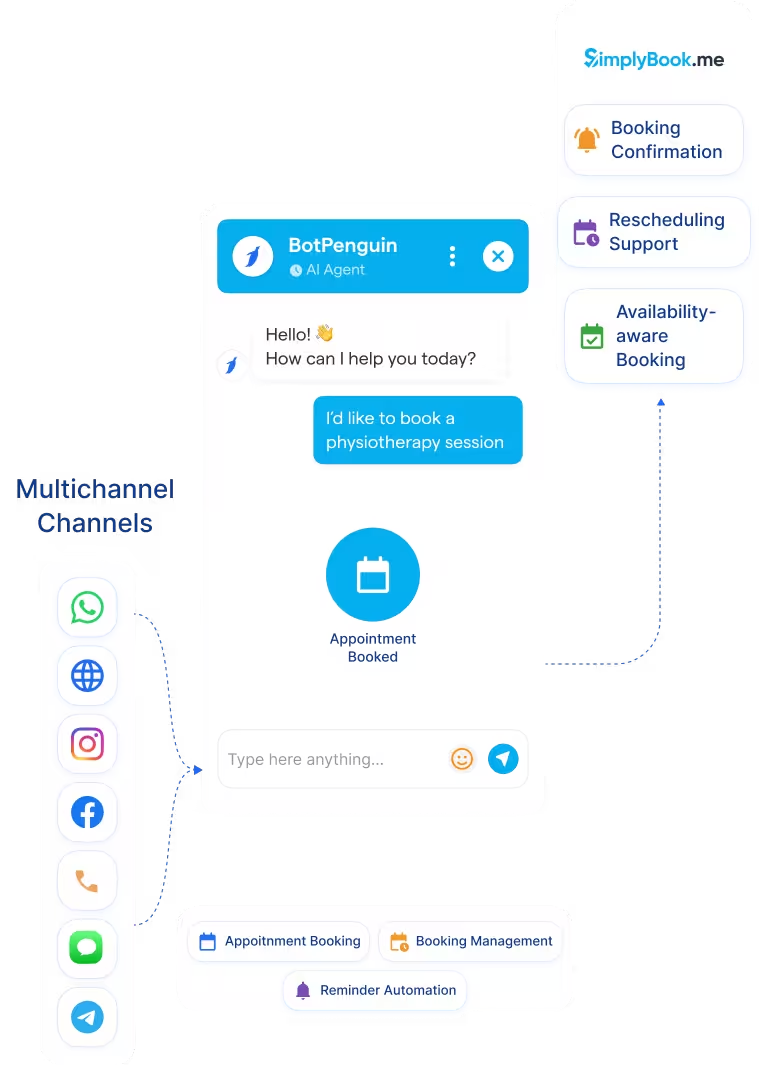
The BotPenguin SimplyBook integration adds the conversational booking layer. Clients can share their service type, preferred time, and contact details in the chat. Your team gets booking-ready information without manual back-and-forth. Your clients do not need to search for the booking page first.
Collect the service type, preferred date and time, and client details via WhatsApp or the website chat. Then send booking-ready details to SimplyBook.
See AI Chatbots
Let an AI agent handle multi-service requests, group bookings, rescheduling questions, and waitlist inquiries before handoff.
See AI Agents
Trigger booking follow-ups from chatbot events. An appointment request, a needed reschedule, or a due reminder can start the right conversation.
View IntegrationsSimplyBook is built to manage appointment scheduling for service businesses. It helps clients book through booking pages, widgets, and supported booking channels. It also supports reminders, cancellations, rescheduling, payments, and staff calendars. Once a booking is created, SimplyBook helps run the scheduling process.
Clients do not always start on a booking page. Many first message your business on WhatsApp, Instagram, Facebook, or your website. Those chats can require manual replies before a booking is created. The booking intent is there, but the scheduling step is still disconnected.
BotPenguin becomes the conversational booking layer on top of SimplyBook. Clients can book by chatting on the channels they already use. The chatbot collects booking details and can route them into your SimplyBook workflow. Your calendar process starts from the conversation itself.
No developer needed for chatbot setup. Three steps connect SimplyBook scheduling with BotPenguin booking conversations.
Up to 35%
of abandoned carts recovered via WhatsApp AI chatbot automation, with every lead conversation logged in Apptivo CRM and actioned within minutes.
30%
reduction in appointment no-shows after deploying AI-powered WhatsApp reminders, with every patient inquiry synced to Apptivo CRM automatically.
40%+
more qualified leads logged in Apptivo CRM per month after deploying BotPenguin AI chatbots to qualify buyers on WhatsApp, and sync leads automatically.
Connect BotPenguin's conversational AI to your CRM, payment gateway, calendar and eCommerce platform in minutes. No-code, no disruption. Your existing tech stack stays exactly as it is.








Free to start. No credit card required. Live in under 10 minutes.
Is the SimplyBook chatbot integration free?
The SimplyBook integration is included on paid BotPenguin plans. You can also start with a free BotPenguin plan and test the chatbot before upgrading. View BotPenguin pricing
Can clients book a SimplyBook appointment through WhatsApp chatbot?
Yes. Clients can request appointments through WhatsApp. BotPenguin collects service type, preferred time, and contact details in chat.
Does BotPenguin check SimplyBook availability before booking?
BotPenguin can support availability-aware booking where your SimplyBook setup allows it. Exact availability behavior depends on your integration configuration.
Do I need to code to connect SimplyBook to BotPenguin?
No. The integration is no-code. Connect SimplyBook, map booking fields, test a booking request, and go live.
Can clients reschedule a SimplyBook appointment through BotPenguin?
Yes. Clients can request rescheduling through chatbot conversations. The exact update flow depends on your SimplyBook and BotPenguin setup.
Can BotPenguin send appointment reminders using SimplyBook booking data?
Yes. BotPenguin can support appointment reminders through connected channels when booking data is available in your setup.
Can BotPenguin work as an AI agent with SimplyBook?
Yes. BotPenguin AI agents can handle more complex scheduling conversations before routing or confirming the booking.


